
Rectangular to Polar MATLAB: cart2pol, abs, angle & Vectorized Code Guide
Complete guide to rectangular to polar MATLAB conversions. Learn cart2pol, pol2cart, abs, angle, vectorized coordinate transformations, and polar plotting in MATLAB.
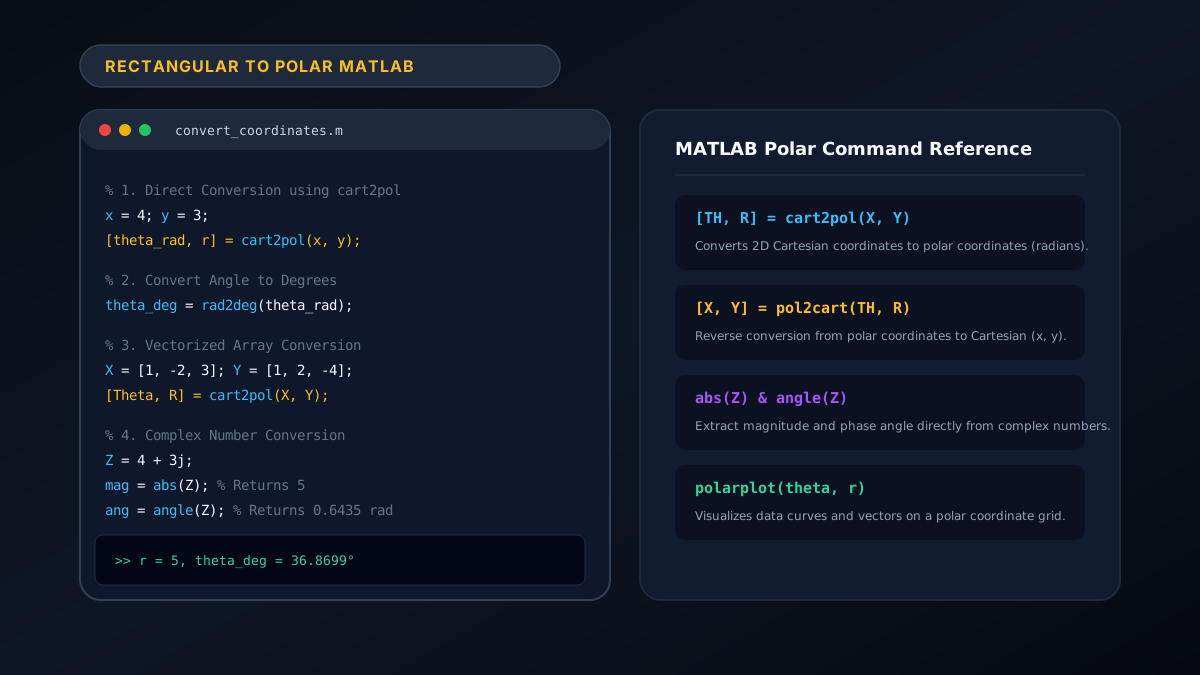
In MATLAB, rectangular to polar conversion is achieved natively using the built-in function cart2pol (syntax: [theta, rho] = cart2pol(x, y)), or by applying abs(z) and angle(z) on complex numbers. The function converts two-dimensional Cartesian arrays $(x, y)$ into angular orientation $\theta$ (in radians, range $[-\pi, \pi]$) and radial distance $\rho = r = \sqrt{x^2 + y^2}$.
Figure 1: Core functions, array vectorization, and polar plotting syntax for rectangular to polar transformations in MATLAB.
Whether you are processing radar arrays, analyzing aerodynamic vector fields, or modeling digital signal processing (DSP) filters, MATLAB provides ultra-fast vectorized functions for high-throughput transformations. If you need immediate one-off conversions without launching MATLAB, test your values on our free rectangular to polar converter or review the mathematical rectangular to polar formula.
1. Primary Method: Using cart2pol in MATLAB
The cart2pol function is MATLAB’s dedicated coordinate transformation utility. It accepts scalars, vectors, or multi-dimensional matrices:
Basic Syntax:
% Define Cartesian coordinates
x = 4;
y = 3;

% Convert rectangular to polar
[theta_rad, r] = cart2pol(x, y);

% Display results
fprintf('Radius r = %.4f\n', r);
fprintf('Angle theta (rad) = %.4f\n', theta_rad);
Converting Output Angle to Degrees:
Because cart2pol returns angles in radians by default, use rad2deg() to convert the angle to degrees:
theta_deg = rad2deg(theta_rad);
fprintf('Angle theta (deg) = %.4f°\n', theta_deg);
% Output: Angle theta (deg) = 36.8699°
2. Vectorized Batch Conversions for Arrays & Matrices
One of MATLAB’s greatest strengths is high-speed array processing. You can convert millions of coordinate pairs simultaneously without writing slow for loops:
% Define arrays of X and Y data points
X = [3, -5, -8,  7];
Y = [4,  12, -6, -24];

% Execute vectorized conversion
[TH_rad, R] = cart2pol(X, Y);
TH_deg = rad2deg(TH_rad);

% Display as structured table
conversionTable = table(X', Y', R', TH_deg', ...
    'VariableNames', {'X_Coord', 'Y_Coord', 'Radius_R', 'Angle_Deg'});
disp(conversionTable);
Table Output:
| X_Coord | Y_Coord | Radius_R | Angle_Deg |
|---|---|---|---|
| $3$ | $4$ | $5.0000$ | $53.1301^\circ$ |
| $-5$ | $12$ | $13.0000$ | $112.6199^\circ$ |
| $-8$ | $-6$ | $10.0000$ | $-143.1301^\circ$ ($216.87^\circ$) |
| $7$ | $-24$ | $25.0000$ | $-73.7398^\circ$ ($286.26^\circ$) |
3. Alternative Method: Using Complex Numbers (abs & angle)
In signal processing and electrical engineering, Cartesian points are frequently represented as complex numbers $z = x + j\cdot y$:
% Create complex array
Z = [4 + 3j, -5 + 12j, -8 - 6j];

% Extract magnitude (radius) and phase angle (radians)
R = abs(Z);
Theta = angle(Z); % Returns values in [-pi, +pi]

% Convert to degrees
Theta_deg = rad2deg(Theta);
4. Visualizing Polar Coordinates in MATLAB: polarplot
To visualize converted polar data directly in MATLAB:
% Generate coordinates along a spiral trajectory
t = linspace(0, 4*pi, 200);
x = t .* cos(t);
y = t .* sin(t);

% Convert rectangular coordinates to polar
[th, r] = cart2pol(x, y);

% Plot on polar coordinate axes
figure;
polarplot(th, r, 'LineWidth', 2, 'Color', [0.2, 0.6, 1.0]);
title('Archimedean Spiral: Rectangular to Polar MATLAB Visualization');
grid on;
5. Reverse Conversion: pol2cart
To convert from polar coordinates back to rectangular $(x, y)$ in MATLAB, use the companion function pol2cart:
% Polar inputs (angle must be in radians)
r = 5;
theta_deg = 36.8699;
theta_rad = deg2rad(theta_deg);

% Convert to rectangular
[x, y] = pol2cart(theta_rad, r);
fprintf('x = %.2f, y = %.2f\n', x, y);
% Output: x = 4.00, y = 3.00
6. Extending to 3D: Cylindrical and Spherical Coordinates
If your dataset contains three dimensions $(x, y, z)$, MATLAB provides:
- Cylindrical Coordinates:
[theta, r, z] = cart2pol(x, y, z) - Spherical Coordinates:
[azimuth, elevation, r] = cart2sph(x, y, z)
Read our complete guide on 3D coordinate systems: cylindrical and spherical coordinates explained.
Summary of MATLAB Coordinate Conversion Functions
| Function / Expression | Input Arguments | Output Values | Primary Use Case |
|---|---|---|---|
cart2pol(x, y) | $(x, y)$ arrays | [theta, rho] | Standard 2D Cartesian to polar conversion (radians). |
pol2cart(th, r) | $(\theta, r)$ arrays | [x, y] | Reverse polar to Cartesian transformation. |
abs(z) & angle(z) | Complex array $z = x + iy$ | Magnitude & Phase | Fast DSP, phasor, and frequency domain analysis. |
cart2sph(x, y, z) | $(x, y, z)$ 3D arrays | [az, el, r] | 3D spherical transformation for physics & robotics. |
polarplot(th, r) | Polar arrays | Polar chart | Plotting antenna radiation patterns, orbits, and spirals. |
For organizations requiring custom MATLAB algorithmic optimization, automated data conversion pipelines, or scientific web application development, learn more at Shahab Dev.
Frequently Asked Questions (FAQ)
What is the difference between cart2pol and atan2 in MATLAB?
cart2pol(x, y) calculates both the radial distance $\rho = \sqrt{x^2 + y^2}$ and the angle $\theta = \text{atan2}(y, x)$ simultaneously in a single command. atan2(y, x) only computes the angle.
Why does MATLAB’s cart2pol output angles in radians instead of degrees?
All native MATLAB trigonometric functions (sin, cos, cart2pol) operate in standard mathematical SI units (radians). You can convert radians to degrees instantly using rad2deg(theta).
How does cart2pol handle negative inputs and Quadrant III coordinates?
cart2pol automatically evaluates signs using internal atan2 logic, outputting angles continuously in the range $[-\pi, +\pi]$ (or $-180^\circ$ to $+180^\circ$).
Can I run cart2pol on GPU arrays in MATLAB?
Yes! If you have the Parallel Computing Toolbox installed, passing a gpuArray to cart2pol(X_gpu, Y_gpu) executes the transformation in parallel across thousands of CUDA cores.